Farming Simulator 2011
|
|
| Farming Simulator 2011 |
|---|
|
Also known as: Landwirtschafts Simulator 2011 (DE), Symulator Farmy 2011 (PL)
 This game has a prerelease article This game has a prerelease article |


 | To do:
|
Farming Simulator 2011 is the third installment of the Farming Simulator series. Coming back to fans adding Deutz-Fahr machinery, Multiplayer and Cows!
Contents
- 1 Sub-Pages
- 2 Debug Options
- 3 Leftovers
- 4 Templates
- 5 Unused M620 Sounds
- 6 Unused Mouse Buttons
- 7 Nonexistent demo_end_screen02.png file
- 8 Trisynergy, Gamesload and Normal Demo Switches
- 9 Filltype Typo
- 10 Anti-Piracy
- 11 Oddities
- 12 Easter eggs and bonuses
Sub-Pages
| Prerelease Info |
Debug Options

In Documents\My Games\FarmingSimulator2011\game.xml, between <development> brackets, set the <controls> value to true. This enables the developer console.
- ~: Toggles the console. Pressing ~ again shows the text bar which lets you type in commands. (Tab ↹ can be used to cycle between available commands. ) Pressing ~ again closes the console.
- F2: Shows framerate.
- F4: Wireframes the map.
- F5: Draws collision boxes.
- F7: Cycles through cameras set up around the map.
- F8: Cycles through debug stats.
- F9: Tries connecting to local Visual Remote Debugger at port 5425. Fails.
- F10: Tries connecting to local Remote Debugger at port 61407. Fails.
Development Version
There is a hidden development version of the game. It is activated via a bool g_isDevelopmentVersion in the main.lua script file. It provides some things centered around testing the features, namely:
- Hidden "Fast Loading Map" selectable in the level select menu. It is the normal map, but it doesn't load cows, traffic, pedestrians, achievements, PDA icons, glass containers, info triggers and collectable bottles.

  if g_isDevelopmentVersion then
    MapsUtil.addMapItem("FastLoadingMap", "dataS/missions/FastLoadingMap.lua", "FastLoadingMap", "dataS2/menu/briefingScreen/careerMap01", "careerMap01", "profileTemplate/careerVehicles_fastLoadingMap.xml", "Fast Loading Map Dev Map", "Fast Loading Map Dev Map", "data/maps/map01/map_preview.png", "", nil)
  end
- 8 times faster running speed.
      if g_isDevelopmentVersion then
        self.runningFactor = 16
      else
        self.runningFactor = 2
      end
- Game starting with manure and liquid manure amounts set to 10,000
      if g_isDevelopmentVersion then
        savegame.farmSiloAmounts.liquidManure = 10000
        savegame.farmSiloAmounts.manure = 10000
      end
- Additional console commands; Note: These commands along with gsSetMilkDifficulty are removed upon loading a mission.
| Command: | Function: |
| gsCheatMoney gsCheatSilo (fillType) (amount) |
Adds 1 million currency (1,000,000) |
| Possible filltypes: |
| wheat barley |
Leftovers
For some unknown reason, there are still various leftovers from FS2009 present in the game's DataS.gar and DataS2.gar archives. While some of these were re-used (such as the market or church), some were left in the directory unused.
Farming Simulator 2009 Mission Icons
There are mission images and their templates from FS2009 in the directory. What is even more odd is the fact that there are only white icons present and no sight of green ones. Green mission icons were used for "tutorial" missions (5 part missions set about cultivating, plowing, harvesting etc.).
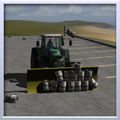
Leftover beer can pushing mission icon.
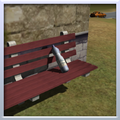
Leftover bottle finding mission icon.
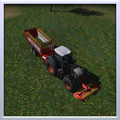
Leftover grass mowing mission icon.
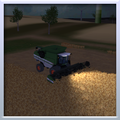
Leftover night threshing mission icon.
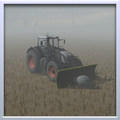
Leftover rock pushing mission icon.
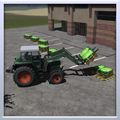
Leftover bag stacking mission icon.
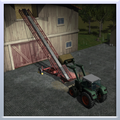
Leftover straw moving mission icon.


Farming Simulator 2009 PDA Icons
The DataS2.gar contains unused FS2009 PDA icons.

Leftover bottle from bottle seeker mission PDA icon.
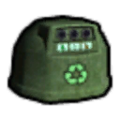
Leftover bottle bin PDA icon.

Leftover exploration mission marker PDA icon.

Leftover skatepark PDA icon.


Various Version Leftovers
The game also contains various images related to demo versions of the game. While these are unused within the normal full editions of the game, you can make the game use them by switching various bool functions in the game's main.lua file. These are described further into the article.

Demo icon from the demo version of the game.

Demo screen from the trisynergy demo version of the game.
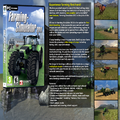
Demo screen from the normal demo version of the game.


Farming Simulator 2009 Scripts
Developers left some scripts from the older release and never used them. Some of these include:
- Saucer.lua which was used in FS09 for the UFO easter egg.
- Fountain.lua which was used in FS09 for the small fountain found near spawn.
- DemoEndScreen.lua which was used in demo versions to add demo related stuff such as a demo timer.
Templates
The game's DataS2.gar still contains the template files used by the developers to create imagery. The only one that doesn't require decompiling the .gar file is store_template.png stored in sdk directory of the game.

Green mission template from FS09.

White mission template from FS09.

Store item template.

Achievement icon template.


Unused M620 Sounds
There is an alternate start sound for the Deutz Agrotron M620 that is unused found in the deutz folder in vehicles
| Unused Start Sound | Used Start Sound |
|---|---|
There is also a matching set of idle and stop sounds in the folder, these are identical to the final version apart from the volume, which was lowered in the final version to match the new start sound.
Interestingly the unused version has a name formatted more closely to other assets for the M620.
The unused version is named deutzAgrotronM620_start Which matches with most other files for the M620 eg. deutzAgrotronM620_diffuse
While the version used in game is simply named agro620_start
Unused Mouse Buttons
There are 3 unused mouse graphics in the game's directory. While referenced in the scripts, for some reason they don't show up under any circumstances. It might've been added for modders to be able to create more actions than in the base game, but for now these remain unused.

Unused BothMouseButton indicator image.

Unused MiddleMouseButton indicator image.

Unused NoneMouseButton indicator image.


Nonexistent demo_end_screen02.png file
In the game's script DemoEndScreen.lua there is a part of code that selects demo end background. One of those - demo_end_screen02.png isn't present in the game's directory, but exists in the demo versions even though both demo_end_screen and demo_end_screen02 are the same.
function DemoEndScreen:onCreateBackground(element)
  if g_isGamesloadDemo then
    element:setImageFilename("dataS2/menu/demo_end_screen" .. g_languageSuffix .. ".png")
  elseif g_isTriSynergyDemo then
    element:setImageFilename("dataS2/menu/demo_end_screen_trisynergy_en.png")
  else
    element:setImageFilename("dataS2/menu/demo_end_screen02" .. g_languageSuffix .. ".png")
  end
end
Trisynergy, Gamesload and Normal Demo Switches
For unknown reasons the developers left behind simple switches between game versions in main.lua file. These alter game's behavior such as possibility to open the shop, select certain buttons in the menu etc. A fun oddity is that you can switch these to true in full versions of the game, blocking access to career mode, achievements, multiplayer and most missions - but you can also switch these to false in demo versions, telling the game that you are playing full version, though this one isn't as fun because the demo version doesn't have most vehicles or implements included in the game's data, hence it just crashes the game.

g_isDemo = false
g_isGamesloadDemo = false
g_isTriSynergyDemo = false
g_isDevelopmentVersion = false
Filltype Typo
More of a fun fact than unused content but a condition check in Trailer.lua has a typo that doesn't seem to break anything. The developer put FILLTYPE.UNKNOW instead of FILLTYPE.UNKNOWN
if self.currentFillType ~= Fillable.FILLTYPE_UNKNOW and self.currentTipTrigger ~= nil and g_currentMission:getIsTrailerInTipRange(self, self.currentTipTrigger) then
Anti-Piracy
The anti-piracy system entirely depends on the game's unique product key. If the same key has been used on multiple devices at the same time, the key is banned, making multiplayer games completely inaccessible. The next time the game is booted up, the game will require a product key, and entering a banned key will grant access to the full game that works flawlessly on single-player game modes, only with the abovementioned multiplayer ban. The exact same Anti-Piracy system is used on all later Farming Simulator titles.
Oddities
Map01 briefing image tractor
On the third briefing image used for Map01 appears what seems to be a Deutz-Fahr Agrofarm 430 tractor without front loader arms. Normally, this tractor cannot be purchased without the front loader arms. This is very possibly a remain from the game's earlier development, as this variation of the tractor can be seen in some prerelease media.

ToggleFlightAndNoHUDMode mission hud
The gsToggleFlightAndNoHUDMode console command gives the player the ability to enable and disable the HUD visibility. However, once you deactivate and then reactivate the HUD in Career mode, the mission progress box will also appear. This box is only ever intended to appear in the Mission mode and never in Carrer mode. This issue is caused due to the game not checking wether or not you're in a mission and affects this HUD element regardless of your game mode.

Farming Simulator 2009 leftovers
As Farming Simulator 2011 was built upon it's predecessor Farming Simulator 2009, it is expected for it to have some leftover assets from it. Some assets, however, were probably meant to be changed for the final release, but ultimately werent.
Mission results UI
While the game has new UI elements, GIANTS didn't bother changing backgrounds for missions, so everything is new besides mission dialog backgrounds which still retain the transparent FS2009 style.

Mission failed dialog. Notice how different is the middle one from the clock one.
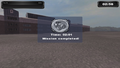
Mission completed dialog. Ditto.


Lighthouse PDA icon
The lighthouse icon used for the PDA pictures the model found in FS2009 and not the updated FS2011 one.

The PDA icon.
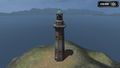
The FS2011 model.


Prerelease build leftovers
Some assets from the game's development were left unchanged for the final release.
Game executable icon
The icon for game's main activation executable, FarmingSimulator2011.exe (or FarmingSimulator2011Game.exe, depending on the game version), pictures an early orthographic side render of the Deutz-Fahr Agrotron M620 tractor. This render seemingly lacks the model decals on the side of the tractor's hood and features the early wheel models seen in the game's prerelease captures. Interestingly, when publishing the game to the Apple Mac App Store, GIANTS Software made an updated icon that pictures the Deutz-Fahr tractor with its look from the final release. The actual executable of the game, however, never ended up being updated.
| The original executable icon. | The updated Mac App Store icon. |
|---|---|
 |
 |
Map01 preview icon
The preview icon for Map 01 on the map selection menu features the prerelase version of the map, with the FS2009 terrain textures and traffic car colors.

Farming Shop background
On the background used for the Farming Shop menu, a Deutz-Fahr Agrotron K420 tractor that features the early wheel models can be seen in front of the shop building.
| The tractor in the shop background. | Same tractor with the final appearance. |
|---|---|
 |
 |
Vehicle texture errors
Deutz-Fahr Agrofarm 430 texture
If you look on the rear wheel fenders of the Deutz-Fahr Agrofarm 430 tractor, two black lines can be seen near their bottom ends. This was likely caused because some developer accidentaly used a clone stamping tool on the tractor's texture while editing it. It's not only the fenders that got affected by the mistake, but also some other things, such as the tractor engine and tool hitch texture.
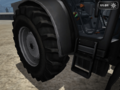
The bottom end of the rear fenders with the abovementioned two black lines.
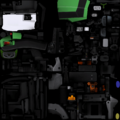
The whole texture of the tractor on which the issue can be seen more clearly.


Deutz-Fahr 7545 RTS grain header texture
The texture on the Deutz-Fahr 7545 RTS grain header's side arm is adjusted incorrectly, which leaves some black parts on the edge where the usual Deutz-Fahr green color is supposed to be.
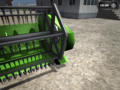
The cutter's side arm as it appears in game.
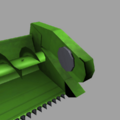
A better view of the side arm in GIANTS Editor.


Easter eggs and bonuses
Like in all other Farming Simulator titles, developers have left some neat and goofy easter eggs.
Secret Deutz F1 M414 tractor
Upon collecting 50% (half) of the achievements, the player is notified about unlocking a secret and is given the Deutz F1. The tractor is then available in the shop at all times, with the ability to sell it or buy more, like every other shop item.
The Farming Simulator series
| |
|---|---|
| Windows, Mac OS X | 2008 • 2009 • 2011 • 2013 • 2017 • 2019 • 2022 |
| Xbox 360, PlayStation 3 | 2013 |
- Games developed by GIANTS Software
- Games published by GIANTS Software
- Games published by Astragon
- Games published by Tri Synergy
- Windows games
- Mac OS X games
- Games released in 2010
- Games released in October
- Games released on October 18
- Games with unused areas
- Games with unused code
- Games with unused graphics
- Games with unused sounds
- Games with debugging functions
- Games with anti-piracy methods
- Games with hidden bonus content
- To do
- Farming Simulator series
Cleanup
Cleanup
Cleanup
Cleanup > To do
Games > Games by content > Games with anti-piracy methods
Games > Games by content > Games with debugging functions
Games > Games by content > Games with hidden bonus content
Games > Games by content > Games with unused areas
Games > Games by content > Games with unused code
Games > Games by content > Games with unused graphics
Games > Games by content > Games with unused sounds
Games > Games by developer > Games developed by GIANTS Software
Games > Games by platform > Mac OS X games
Games > Games by platform > Windows games
Games > Games by publisher > Games published by GIANTS Software
Games > Games by publisher > Games published by Team17 > Games published by Astragon
Games > Games by publisher > Games published by Tri Synergy
Games > Games by release date > Games released in 2010
Games > Games by release date > Games released in October
Games > Games by release date > Games released in October > Games released on October 18
Games > Games by series > Farming Simulator series
Hidden categories > Pages missing date references
Hidden categories > Pages missing developer references
Hidden categories > Pages missing publisher references

