Lumines Arise
|
|
| Lumines Arise |
|---|
|
Developers: Enhance,
Monstars
 This game has a prototype article This game has a prototype article This game has a prerelease article This game has a prerelease article |


Lumines Arise is the latest entry in the series, and the first new game after a 9-year hiatus to be developed on the Unity engine. It boasts new features such as the "Burst" mechanic, which stops matched 2x2 blocks from being cleared to create even bigger squares for combos and increase your score; the "Burst Battle" multiplayer mode, and a new "Journey" mode with 35 stages. With this annual release contains a tracklist inspired by various music genres composed by Tetris Effect composers Takako Ishida, and Hydelic; featuring a variety of artists (Krysta Youngs, Luma, Kymara, Jamell Patten, Honey-B-Sweet, Sean Christopher and Lindsey Sweat).
 | To do:
|
Contents
Sub-Pages
| Prototype Info |
| Prerelease Info |
Unused Graphics
Leftover Demo Graphics
There's leftover textures from the limited-time Demo in "Assets/Lumines/InGame/Pause/P_PauseManager.prefab" and "Assets/Lumines/InGame/Result/P_ResultManager.prefab".

Wish List button (PC)

Wish List button (PS5)

The Demo's "Thank you for playing!" screen graphic


Early Game Logo
There're leftover 3d models of an early game logo found in "LuminesArise_Data/level6". Those models show that the game was initially called "Lumines X new moon" before being renamed to "Lumines Arise" at some point of development.
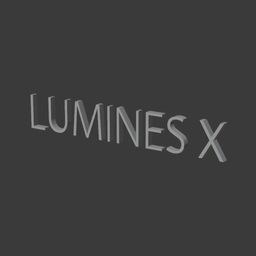
"Lumines X" part of the logo

"new moon" part of the logo
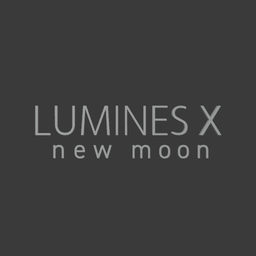
Full logo recreation


Usused Rank Models
There're unused rank letter 3d models found in "Assets/Lumines/InGame/Result/Rank/". In final game for displaying rank letter 2d sprites are used instead. Interestingly there's a model for an "SS" rank which is not possible to acquire in final game (the maximum possible rank is "S"). The model used completely different font which suggests that this rank was dropped very early in development.

Rank "D" model

Rank "C" model

Rank "B" model

Rank "A" model

Rank "S" model

Rank "SS" model


Unused Bonus 3D Models
These unused 3D models related to the bonus animation were found in "Assets/Lumines/InGame/InGameUI/BonusArrow/P_BonusArrowManager.prefab". In early versions, the bonus multiplier text and bonus arrow animation were made out of 3D models, which is similar to how it was done in Lumines: Electronic Symphony. In the final game, the bonus multiplier text and bonus arrow are instead made out of 2D text and sprites. There's also a model for a x2 bonus multiplier, which was never present in any other Lumines game in the series before.

Bonus arrow model

Bonus text model

x2 bonus multipiler model

x4 bonus multipiler model

x8 bonus multipiler model

x12 bonus multipiler model

x16 bonus multipiler model


Unused Game Modes
Color Battle
| To do:
|
This is a cut co-op multiplayer game mode that works similar to the "Connected" game mode in Tetris Effect: Connected. There's plenty of assets left out from it in the game files, starting from a whole tutorial screen which describes this mode, hidden in "Assets/Lumines/Menu/Mission/Techniques/P_TechniquesManager.prefab". This is the only tutorial screen present in the files, and is an early one, as it uses unfinished Loomii avatar models and text is written onto the image itself, unlike the other used tutorial images where text is rendered by the game engine.

There's also plenty of leftover boss and enemy textures and models in "Assets/Lumines/InGame/GameModes/ColorBattle/ColorBattleAsset.asset". Most of them have 4 color variants: red, green, yellow and purple:
| Name | Textures | Model |
|---|---|---|
| Toucan | 
|

|
| Parrot |    
|
   
|
| Flamingo |    
|
   
|
| Chameleon |    
|
   
|
| Snake |    
|
   
|
| Elephant | 
|

|
| Crocodile | 
|

|
| Leopard | 
|

|
The game still has the stage intended for this deleted game mode, under ID 103. This stage re-uses the "TROPICAL SURVIVAL" stage's music (Run It Up (feat. Jamell Patten & Krysta Youngs)) and graphics assets, but also includes two more textures which were used for this game mode's blocks;. The first is a stock reference photo of bananas, and the other is a texture for some purple flowers.


Survival Score Attack Mode
| To do: Rip the SFX from skin 101's data. |
This game mode would had been a survival run-based take on the Score Attack mode in Tetris Effect: Connected, as only two assets left from it are a gradient texture as a "score up area" and a clock icon, both found in "Assets/Lumines/InGame/InGameUI/SurvivalScoreAttack/P_InGamePlayerUI_SurvivalScoreAttackMain.prefab".


There's still a stage intended for this game mode under ID 101, and re-uses the "NEON STREETS" stage's assets and music (Bass Cycles).
Unused Stages
Most of the unused stages only have leftover data text files. Only two of them have names in "Assets/Lumines/System/MessageData/NM_Stage.csv" that are "GEMS" (ID 22) and "BIRD" (ID 32), though a few have some more assets leftover and only those stages are worth describing here.
BIRD
| To do: Add the pigeon model |
This stage is under ID 32 and is an early version of the "ON EGGSHELLS" stage, as it has a lot of animation/behaviour files related to pigeons and even has 3 textures (regular, black and white) and a model for one. The stage was scrapped and re-made from the ground up into the final version, which is under ID 59. Sound data files show that it's music (In Black and White) initially used 146 BPM, while the final version uses 170 BPM.
| Original texture | White variant | Black variant |
|---|---|---|

|

|

|
ID 52
This stage has two leftover square sprites.


ID 300
This stage was made for testing purposes, as it re-uses leftover Lumines Remastered "Shinin'" skin blocks.


It also has a video played as the background, which none of the final game's stages have. The required for playback video file is called: "st01_bg_movie_01.mp4" and it's not present anywhere in the game's files. Other unused stages which had a video as the background are under ID's: 12, 51, 52 and 55.
Unused Mission Mode Challenges
There's text data for unused Mission mode challenges in "Assets/Lumines/System/MessageData/NM_Quest.csv". Most of them are earlier versions of the final game's ones with early internal names/descriptions texts, but there's also some text referencing to completely unused challenges. Also, most of the unused challenges descriptions/goals refer to squares, not 2x2 squares like the final's challenges. "Quest" is oftenly used in the early descriptions/goals, which is the internal name for Mission mode.
| ID | Name | Description | Goal | Notes |
|---|---|---|---|---|
| 021 | ANOTHER FORM | Make Squares using blocks that have unusual shapes. | Clear as many 2x2 Squares as possible within the time limit. | Exists in the Final release, but there's a present leftover variant of the goal text. The final version's goal is: "Clear at least [Param] 2x2 Squares within the time limit.". |
| 031 | GIMMICKS | A quest to check the gimmick. | Erase [Param] square. | A test challenge. |
| 042 | CHAINS2 | Let's aim to dig deeper by making use of the chain block. | Survive until the end. | Early version of the CHAINS 2 challenge which is under ID 043. The final version's description is: "Use chain blocks to burrow further through the Playfield.". |
| 051 | REBORN | A quest where entire columns fall, rain, and blocks are swapped to prevent completion. | Erase [Param] square. | This one's similar to the "HEAVY SNOW" challenge, but it works differently and is more difficult. |
| 071 and 072 | NARROW GATE | Will you be able to withstand the increasingly narrow field? | Erase [Param] square. | Both challenges are earlier versions of the "GOLDFISH BOWL" challenge which is under ID 073. They both share same description/goal/name despite having different ID's. The final version's description is: "Can you cope with this ever-narrowing Playfield?". The final version's goal is: "Clear [Param] 2x2 Squares.". |
| 081 | HEAVY SNOW | An exhilarating quest where many white blocks appear and it is easy to create squares. | Erase [Param] square. | Early version of the "HEAVY SNOW" challenge which is under ID 083. The final version's description is: "Overcome a blizzard of snow blocks.". The final version's goal is: "Clear [Param] 2x2 Squares.". |
| 082 | HEAVY SNOW | Lots of snow blocks are coming down. | Erase [Param] square. | Early version of the "HEAVY SNOW" challenge which is under ID 083. The final version's description is: "Overcome a blizzard of snow blocks.". The final version's goal is: "Clear [Param] 2x2 Squares.". |
| 091 | BIG SQUARE | 雪ブロックで5×5のスクエアを作ろう。 (tr: Create a 5x5 square with snow blocks) |
雪ブロックで5×5のスクエアを作ろう。 | Likely used the same stage as "HEAVY SNOW". This is the only unused challenge with untranslated Japanese text, as all others have English text. |
| 101 | MEMORY | Make a square by memorizing the blocks that will be hidden. | Erase [Param] square. | Early version of the "BRAIN TRAINING" challenge which is under ID 102. The final version's description is: "Memorize the locations of hidden blocks in order to make Squares.". The final version's goal is: "Clear [Param] 2x2 Squares." |
| 121 | MANY ORDERS | Achieve and clear as many goals as possible. | Does not have dedicated goal text, as it was probably changed in-game. | |
| 151 | MAGNET | Try to draw blocks of the same color together to erase a large amount. | Erase [Param] square. | There's some other files inside the game referring to the "magnet" gimmick, but it's completely unused. |
| 161 | INVISIBLE | An invisible quest where something is always hidden somewhere. | Erase [Param] square. | Early version of the "INVISIBLE" challenge which is under ID 162. The final version's description is: "A challenge in which something is always hidden.". The final version's goal is: "Clear [Param] 2x2 Squares." |
| 171 | NO ROTATE | Let's create a square while block rotation is prohibited. | Erase [Param] square. | Early version of the "RESTRICTIONS" challenge which is under ID 172 and only had the "no rotate" gimmick. The final version's description is: "Make Squares under various restrictions.". The final version's goal is: "Clear [Param] 2x2 Squares." |
| 182 | GROWTH | A quest where the blocks grow and change shape. | Erase [Param] square. | Early version of the "GROWTH" challenge which is under ID 183. The final version's description is: "A challenge in which the blocks grow and change shape.". The final version's goal is: "Clear [Param] 2x2 Squares." |
| 191 | LIMBO | Can you overcome the obstacles that destroy what you have built up and reach the goal? | Erase [Param] square. | An unused challenge involving obstacles that could eliminate blocks on your playfield. |
| 201 | GIMMICK BOX | A unique quest with a large collection of unique gimmicks. | Erase [Param] square. | An early version of the "MYSTERY" challenge. The final version's one is under ID 211, so this unused version would have worked differently. |
| 221 | ∞BURST | BURST that never stops from start to finish. | Erase [Param] square. | A Challenge with Infinite Burst? |
| 241 | FINARE | A difficult quest with many gimmicks. | Erase [Param] square. | Yes, there's a typo in this challenge's name. Early version of the "FINALE" challenge which is under ID 242. The final version's description is: "Overcome some of the gimmicks you've already encountered and create a 10x10 Square.". The final version's goals are: "Clear 300 2x2 Squares to build up the Burst counter." and "Activate Burst and create a 10x10 Square.". |
| 271 | RUNAWAY | Endure the ultra-fast fall. | Survive until the end. | This challenge is similar to the "SUPER EXPRESS" challenge, but it works differently. |
Platform Differences
- With the game's Deluxe Digital Edition, the PlayStation 5 version has a special nameplate, Loomii avatar and emotes based on Astro Bot, while the Steam/Windows version has a special nameplate, Loomii avatar and emotes based on Dave the Diver.
Revisional Differences
| To do:
|
Ver. 1.0.6.
Released on November 11, 2025 as the initial original release of the game.
Ver. 1.0.7.
Released on November 17, 2025 with the following change:
- In Journey mode, an issue was fixed where the game could crash in the "Goldfish Tango" stage skin in Area 3.
Ver. 1.0.8.
Released on November 20, 2025 with the following changes:
- Fixed a bug where columns of blocks would sometimes disappear during Burst.
- Adjusted the Customize screen so that customization items acquired from Weekend Loomii Live events are immediately reflected.
- The rankings under Data will now display local scores even when the player is not ranked.
- In Burst Battle, a bug where music would loop continuously after starting a match while in the customization block selection screen was fixed.
- In Burst Battle, a bug where the VS screen animation and the Burst count would not be visible if a match was started while the player was in the Data or Customize screens was fixed.
- Fixed various UI elements and localization text.
- In the Options screen, a bug where players could not navigate to other option tabs after entering the “Graphics” tab was fixed (Steam/Windows version only).
- Fixed a bug where the game ignored your launch settings and launched in VR mode if a VR headset was connected (Steam/Windows version only).
- Fixed a bug in Journey’s Survival mode, where some sounds would stop playing, and if play continued, the final stage could not be cleared (Steam/Windows version only).
- Fixed a bug where the UI on the playfield could become invisible (Steam/Windows version only).
- In Journey mode, fixed a bug where the cursor would behave incorrectly after opening and closing the Options menu when selecting difficulty (Steam/Windows version only).
Ver. 1.0.9.
Released on November 27, 2025 with the following change:
- Fixed a bug in Journey, Playlist, and Challenges, that caused framerate drops during gameplay. This bug was introduced in the last patch.
Ver. 1.0.10.
Released on December 3, 2025 with the following changes:
- In Customize, items unlocked and available will now sort to the top of each category.
- Added a new graphic setting: Handheld Mode. This preset enables optimizations specifically for Steam Deck and other handheld devices. (Steam/Windows version only)
- Across all modes, blocks were updated for better visibility with Color Filter settings enabled.
- In Burst Battle, added a Local Match button, making it easier to set up a couch match against a friend on a second controller or a Vs CPU game.
- In Burst Battle, adjusted Ranked Match matching to more accurately pair similar-level players.
- In Leaderboard League, added a High Score display to the UI to show your personal best while playing.
- In Journey mode, added the ability to retain the block position during transitions. Go to Options>Game>Retain Block Positions to enable it.
- In Journey mode, updated the readability of blocks on the Globe stage during Burst.
- In Leaderboard League, added an option to use the tutorial blocks for improved readability. Go to Options > Accessibility > Leaderboard League Blocks to adjust.
- In Customize, added an option to randomize your preferred block set for Burst Battle.
- Fixed a bug where the game would not close properly and remain as a task in the background. (Steam/Windows version only)
- Fixed a bug where the game would softlock if the player used Alt + Tab just before topping out. (Steam/Windows version only).
- In Journey mode, fixed a bug where the music could stop playing in the Duo Soul, Rain Steps, and Spider Webs stages.
- In Options, updated the Color Filter options to better describe the setting (Protanopia, Deuteranopia, Tritanopia).
- In Options > Controls, fixed a bug where buttons would not properly update. (Steam/Windows version only).
- Fixed other minor UI and text issues.
Ver. 1.0.11.
Released on December 12, 2025 with the following changes:
- Updated the default graphics settings for Steam Deck. (Steam/Windows version only).
- Added an extra trophy check to fix issues where certain trophies were not unlocking or displaying properly. (Steam/Windows version only).
- Added the ability to turn off whether Loomii will appear after a Burst. Go to Options>Accessibility>Post-Burst Loomii to configure.
- In Burst Battle, fixed a bug where performing a Burst of 0 would use the previous Burst value.
- In Journey mode, fixed a bug in phase three of Slice & Dice where fruits and vegetables would interfere with the playfield even when background effects were set to Very Subtle.
- In local Burst Battle, fixed a bug where the second player’s controller wouldn’t vibrate.
- In Options, fixed a bug where changing tabs quickly would not load the option text.
- Fixed other minor UI and text issues.
Ver. 1.0.12.
Released on January 7, 2026 with the following changes:
- In Loomii-Pon, haptic feedback for controllers has been added. (Steam/Windows version only)
- In Missions, a bug where the game would crash after completing the Finale challenge was fixed. (PlayStation 5 version only)
- In both Journey and Playlists, a bug where the UI would not properly display after exiting was fixed.
The Lumines series
| |
|---|---|
| PlayStation Portable | Puzzle Fusion • II (Demo) |
| Xbox 360 | LIVE! |
| Adobe Flash | II Taster Version |
| PlayStation 2 | Plus |
| Windows | Puzzle Fusion • Remastered • Arise (Demo) |
| PlayStation 3 | Supernova |
| PlayStation Vita | Electronic Symphony |
| iOS, Android | Puzzle & Music |
| PlayStation 4, Xbox One, Nintendo Switch | Remastered |
| PlayStation 5 | Arise (Demo) |
| See also | |
| Every Extend • Gunpey • Meteos | |
- Games developed by Enhance
- Games developed by Monstars
- Games published by Enhance
- Windows games
- PlayStation 5 games
- Games released in 2025
- Games released in November
- Games released on November 11
- Games with unused game types
- Games with unused graphics
- Games with unused text
- Games with revisional differences
- To do
- Lumines series
Cleanup
Cleanup
Cleanup
Cleanup > To do
Games > Games by content > Games with revisional differences
Games > Games by content > Games with unused game types
Games > Games by content > Games with unused graphics
Games > Games by content > Games with unused text
Games > Games by platform > PlayStation 5 games
Games > Games by platform > Windows games
Games > Games by publisher > Games published by Enhance
Games > Games by release date > Games released in 2025
Games > Games by release date > Games released in November
Games > Games by release date > Games released in November > Games released on November 11
Games > Games by series > Lumines series
Hidden categories > Pages missing date references
Hidden categories > Pages missing developer references
Hidden categories > Pages missing publisher references
Games developed by Enhance
Games developed by Monstars

