DiRT 3
|
|
| DiRT 3 |
|---|
|
Developer: Codemasters
|


 | To do:
|
DiRT 3 is the third game in the DiRT series. It introduced a new game mode called Freestyle Gymkhana (based on Ken Block's popular Gymkhana YT videos), and it has a stronger focus on rally racing, as well as other off-road disciplines such as rallycross and trailblazer.
Contents
Debug Config
In the Mac version (original release), there's a config.xml file used in debug builds. However, as there is no stuff related to this game, this may be a leftover from DiRT 2's debug builds.
<?xml version="1.0" standalone="yes" ?>
<config>

  <track location="croatia" name="croatia_rally" override_fe="0" route="route_0"/>
  <car name="sti" livery="01" override_fe="0" ai_driver="dev_1.0" grade="no" driver_head="male_04" codriver_head="female_02" override_heads="1" dashboardItem="hula_girl_01_objecttype" mirrorItem="magic_tree_01_objecttype" enable_dashboard_item_config="0" enable_mirror_item_config="0" />

  <!-- skipfe
        set enabled to "1" to skip the front end and enable settings
        set go_via_garage to "1" to load the garage in between all races
        set num_ai_cars to the number of AI cars you want (set -1 to get the 'right' number for the discipline) - max is currently 19
        set cycle_tracks to "1" to cycle through every route track in the game.
        set num_laps to the number of laps you want in the race
        set discipline to the name of the discipline to use( single_race, rallycross, ironman, raid, trailblazer)
        set race_type to the name of the race_type to use(standard, staggered, last_man_standing, gate_crasher, owned)
        set competition to the name of the competition type to use (single, qualify, knockout)
        set difficulty_level to the name of the difficulty level to use (pro)
        set difficulty_ratio to the progress through the difficulty level (0.0 to 1.0)
        set deterministic_grid="1" to place the grid in the same order every time and "2" to place the player at the back of the grid as well
        set grid_type to determine grid type, valid options are: "standard", "rolling" and "head_to_head"
        set min_grid_places to the number of cars you want to consider in the grid, so if there are no ai car but its set to 15 you will end up considering a grid of 16 cars for placement.
        set quickmatch if you wish to enter a network match quickly
        set quickmatch_online to set the net mode, 1 is online, 0 is LAN
        set endurance="1" to make the race a timed race featuring variable time of day
        set endurance_realtime_mins="XX" to set the real-time duration of the race in minutes
        set endurance_gametime_hours="XX" to set how many hours the race should last (i.e. not real time but game-world time).  Note this is in whole hours, "3.5" will just be 3
        set endurance_start_time_hours="XX" to set the time of day at which the race starts (eg: 14.5 = 2:30pm)
        set disable_rts_textures to 1 to disable the race transition sequence texture bundle being loaded (may help get INTO fe/race when memory is sparse)
        set disable_rts_snapshot to 1 to disable snapshot capture feature at end of fe/race (may help get OUT of fe/race when memory is sparse)
        set enable_rts_screen_capture to 1 to enable capture of rts screenshots on target platform
        set create_race_marker to create a marker file called race_marker on the specified time the game enters the race, or never if 0 is specified
        set return_to_fe to 1 to allow the skipfe career to return to the front end on race exit
    -->
  <skipfe
      enabled="0"
      go_via_garage="1"
      num_ai_cars="7"
      alternate_cars="0"
      cycle_tracks="0"
      num_laps="2"
      discipline="rally"
      race_type="standard"
      competition="single"
      difficulty_level="pro"
      difficulty_ratio="1.0"
      auto_memory_snapshot="0"
      auto_quit_race="0"
      auto_quit_time="10"
      leak_tracking="0"
      leak_track_tty="0"
      heap_tracking="0"
      track_snapshot="0"
      output_race_stats="0"
      career_race_tester="0"
      display_car_stats="0"
      deterministic_grid="2"
      desired_grid_slot="0"
      grid_type="standard"
      min_grid_places="0"
      quickmatch="0"
      quickmatch_online="0"
      force_chase_cam="0"
      endurance_race="0"
      endurance_realtime_mins="24"
      endurance_gametime_hours="24"
      endurance_start_time_hours="15"
      auto_screenshot="0"
      terminal_damage_intro_enabled="1"
      flashbacks_num="5"
      disable_rts_textures="0"
      disable_rts_snapshot="0"
      enable_rts_screen_capture="0"
      create_race_marker="0"
      return_to_fe="0"
      force_30fps="0"
      career_soak="0"
      force_end_game_sequence="0"
  />

  <!--
            use_database_dummy_event - enable to use dummy data in database
            unlock_everything - set to 1 to unlock everything in the game
      -->
  <main_career
      use_database_dummy_event="1"
      database_dummy_event_name="dummy_event"
      unlock_everything="0"
      use_first_race_settings="0"
  />

  <force_first_race_flow
    enabled="0"
    force_on="0"
  />

  <force_career_intro
    enabled="0"
    force_on="0"
  />

  <!-- Map screen config, allows you to stop the map from being always initialised -->
  <map_screen
    always_initialised="1"
  />

  <buttonmashing
    enabled="0"
  />

  <testdrive
      enabled="0"
      ghost_car_type="personal_best"
    />

  <ghostcardev
      make_ai_ghosts="0"
    />

  <car_ai1 name="bmw" livery="00" ai_driver="All_Rounder" grade="no" />
  <car_ai2 name="e9r" livery="00" ai_driver="Cautious_Good" grade="no" />
  <car_ai3 name="cr4" livery="00" ai_driver="Aggressive_Med" grade="no" />
  <car_ai4 name="sor" livery="00" ai_driver="Cautious_Poor" grade="no" />
  <car_ai5 name="sti" livery="00" ai_driver="Cautious_Good" grade="no" />
  <car_ai6 name="350" livery="00" ai_driver="Aggressive_Poor" grade="no" />
  <car_ai7 name="mer" livery="00" ai_driver="Cautious_Good" grade="no" />

  <alt_car_ai1 name="mer" livery="00" ai_driver="All_Rounder"/>
  <alt_car_ai2 name="mer" livery="00" ai_driver="Cautious_Good"/>
  <alt_car_ai3 name="mer" livery="00" ai_driver="Aggressive_Med"/>
  <alt_car_ai4 name="mer" livery="00" ai_driver="Cautious_Poor"/>
  <alt_car_ai5 name="mer" livery="00" ai_driver="Cautious_Good"/>
  <alt_car_ai6 name="mer" livery="00" ai_driver="Aggressive_Poor"/>
  <alt_car_ai7 name="mer" livery="00" ai_driver="Cautious_Good"/>

  <!-- allows you to enable focus lost windows messages in dev and debug builds -->
  <focus_lost enabled="1" />

  <!-- Profiling - set auto_profile="1" to capture profile results for a track
      set force_stop_ai to cause prevent all ai cars from driving
      set auto_drive_human to place the player car under ai control (auto_profile also does this)
  -->
  <profile
    auto_profile="0"
    auto_profile_time="0.0"
    auto_profile_full="0"
    auto_profile_null_gpu="1"
    auto_profile_save="1"
    auto_profile_display="1"
    auto_profile_override_car="1"
    profile_frequency="2"
    display_profile="0"
    auto_profile_desc1="Profile 1"
    auto_profile_desc2="Profile 2"
    display_distance="1"
    profile_gpu="1"
    profile_minimal="0"
    force_stop_ai="0"
    auto_drive_human="0"
    auto_profile_replay="0"
    visual_damage_only="0"
  />

  <!-- Present mode: 0 = use game settings, 1 = one, 2 = two, 3 = three, 4 = immediate -->
  <graphics
      present="0"
      antialias="4"
      infield="1"
      outfield="1"
      routetrack="1"
      trees="1"
      ornaments="1"
      groundcover="1"
      crowd="1"
      particles="1"
      shadows="1"
      postprocess="1"
      interiors="1"
      mirror="1"
      envmapfaces="6"
      widescreen="1"
      sky="1"
      dynamic_ambient_occ="1"
      weather_fx="1"
      in_car_characters="1"
      cloth="1"
      osd="1"
      skidmarks="1"
      streaming_ornament_mips="0"
      pvs="1"
      dev_text="1"
      lights="1"
    />

  <!-- Graphics debugging -->
  <graphics_debug
      render_player_car="1"
      num_rendered_ai_cars="20"
      dev_axes="0"
      multicar_livery="1"
      multicar_damage="1"
      load_shaderpack_database="1"
      force_dev_shaderpack="0"
      force_release_shaderpack="0"
      save_shaderpack_database="0"
      save_shaderpack_database_as_xml="0"
      compile_all_shaders="0"
      car_lod_force="0"
      render_lighting_sphere="0"
      neutral_lighting="0"
      scenery_disable="0"
      scenery_xfade_disable="0"
      load_vehicles_soak_test="0"
      force_night="0"
      force_day="0"
    />

  <debug_renderer
      render_task="1"
      update_task="0"

      render_lines="1000"
      render_tris="500"
      render_quads="200"
      render_boxes="1000"
      render_tboxes="100"
      render_spheres="100"
      render_tspheres="100"

      update_lines="1000"
      update_tris="500"
      update_quads="200"
      update_boxes="100"
      update_tboxes="50"
      update_spheres="50"
      update_tspheres="50"

      num_hemisphere_segments_h="8"
      num_hemisphere_segments_v="4"
    />

    <lights
      headlights="1"
      headlight_material_override="0"
      player_headlight="headlight_damage"
      ai_headlight="headlight_spot"
      num_cone_sides="36"
      clip_planes="0"
      clip_plane_samples="64"
      min_intersections="32"
      clip_plane_offset="-5.0"
      stencil="1"
      draw_distance="0"
      volume_draw_distance="0"
      draw_screen_area="0"
      stencil_screen_area="0.1"
      screen_area_test_enable="1"
      sponsor_override=""
      design_night_lighting="0"
    />

  <!-- tyre types are as follows:

            lightGravel     = 0
            mediumGravel    = 1
            heavyGravel     = 2
            dustyGravel = 3
            lightPeaGravel  = 4
            peaGravel   = 5
            wetGravel   = 6
            intermediateGravel = 7
            mud     = 8
            smoothTarmac    = 9
            roughTarmac = 10
            wetTarmac   = 11
            intermediateTarmac = 12
    -->

  <physics entities="1" tyres="9" />

  <!-- Memory profiling - set recursive="1" to profile all child calls, pssg="1" to also record pssg statistics -->
  <memorydebug
      forcedisplay="0"
      enabled="0"
      recursive="0"
      pssg="0"
      trash_on_alloc="0"
      trash_on_free="0"
        />

  <!-- AI settings
    set force_stop to prevent all ai from driving
    set force_fork_choice to always use the same route on forked tracks
    set auto_drive to place the player car under ai control
    set brake_line_tool to train the ai brake line speeds
    set brake_distance_tool to profile the ai braking distance
    set reduced_mech_tool to generate reduced mechanics data
    set track_edit to work in track editing mode
  -->
  <ai
    force_stop="0"
    force_fork_choice="0"
    auto_drive="0"
    brake_line_tool="0"
    brake_distance_tool="0"
    corner_speed_tool="0"
    driving_setup_tool="0"
    generate_vehicle_track_data="0"
    reduced_mech_tool="0"
    track_edit="0"
    no_car_car_collisions="0"
    use_predetermined_forks="0"
  />
  <!-- AI choreographer settings
    set override_discipline to the choreographer discipline to use
  -->
  <ai_choreographer
    override_discipline=""
  />
  <!-- AI Log settings - this set the default print state of the ai logs -->
  <ai_logs
    all="0"
    default="0"
    dev="0"
    devTools="0"
    behaviour="0"
    choreographer="0"
    temp1="0"
    temp2="0"
  />
  <!-- Catchup settings
    set override_enable to use the choreographer
    set overide_name to override the catchup config.
  -->
  <catchup
    override_enable="0"
    override_name="first_race_rallycross"
  />
  <!-- anti cheat (corner cutting) system -->
  <anti_cheat
    enabled="1"
    enable_debug_print="0"
  />

  <!-- rules system -->
  <rules
    render="0"
  />

  <!-- override what pause menu is displayed when start is pressed.
       available overrides are:
       default_pause
       career_pause
       challenge_pause
       single_race_pause
       time_trial_pause
       net_in_race_pause
       net_spectating_pause
  -->
  <pause_override enabled="0" pause_to_use="default_pause" />

  <!-- override the language to use. available languages are:
         english
         japanese
         german
         french
         spanish
         italian
         usenglish
       Specifying max_length_dirtnet_strings="1" will cause the server to always send the longest valid strings using English regardless of any other language setting.
  -->
  <language_override enabled="0" language_to_use="english" max_length_dirtnet_strings="0" />

  <!-- dummyInputTestingMode - Set enabled="1" to enable the dummy input testing mode. This will cause the input system to return false input data, this can be used to discover crashes within the game -->
  <dummyInputTestingMode enabled="0" />

  <!-- worker_map
        set log="1" to enable print logs for the worker map tasks, "0" to disable logging for those tasks
    -->
  <worker_map log="0"/>

  <!-- racing_sub_state
        set log to "1" to enable the state logging
    -->
  <racing_sub_state log="0"/>

  <!-- unlock everything
    set enabled to 1 to automatically unlock everything once you load up the garage for the first time
  -->
  <unlock_everything enabled="0" />

  <!-- results_editor
        set enabled to "1" to enable the fe results editor. This will bypass the race completely, and let you
        manually set the results of a race
    -->
  <results_editor enabled="0" />

  <!-- skip_race_intro
        set enabled to "1" to skip the introductory sequence on a race. Useful for automated tools that expect the
        race to start as soon as its loaded
    -->
  <skip_race_intro enabled="0" />

  <!-- press start autoload
        set enabled to 0 to turn off autoloading on the press start screen
    -->
  <press_start_autoload enabled="1" />

  <!-- fe logging
        set log to 1 to turn logging on, 0 to turn logging off
        set log_to_file to 1 to log to file, 0 to log to console
        set log_file_name when file is 1 to the filename you want to log to
    -->
  <fe_update_logging log="1"
                     log_to_file="1"
                     log_file_name="fe_update_log.txt"/>

  <!-- flow_system
        set onscreen_node_info to 0 to turn off the debug text showing which state node you're currently in
        set log to 1 to log flow, 0 to turn off logging flow
    -->
  <flow_system  onscreen_node_info="1"
                log="1"/>

  <!-- fe_render_task
        set log to 1 to enable logging, 0 to disable logging
        set log_to_file to 1 to log to file, 0 to log to console
        set log_file_name when file is 1 to the filename you want to log to
    -->
  <fe_render_task_logging log="1"
                          log_to_file="1"
                          log_file_name="fe_render_task_log.txt"/>

  <!-- all cars unlocked
        set enabled to 1 to unlock every car
    -->
  <all_cars_unlocked enabled="0" />

  <!-- all tracks unlocked
        set enabled to 1 to unlock every car
    -->
  <all_tracks_unlocked enabled="0" />

  <!-- timestep
        set fix to "0.0" to use a normally timed time-step
        set fix to anything else to fix the time-step at that value (e.g. "0.02")
        set cap to the value you'd like to cap the time-step at
    -->
  <timestep fix="0.0" cap="0.08"/>

  <!-- devmenu

        set pause to "1" to make the dev menu pause/unpause the game when activated/deactivated,
        or "0" to not do that

        debounce_delay determines how long you have to hold a button before it auto-repeats.
        Make this larger if its auto-repeating too quickly, or smaller if its not auto-repeating
        quickly enough.
    -->
  <devmenu pause="0" debounce_delay="10"/>

  <!-- career
        set skip_races to "1" to skip the actual race (jumps from pre-race to post-race state)
      set all_use_player_car to "1" force all drivers to use the same car as the player
    -->
  <career
    skip_races="0"
    all_use_player_car="0"
  />

  <!-- career_dummy_track
        set enabled to 1 to enable a dummy track for the career
        then set the track name, folder and route to use as default
            There then follows overrides for city tracks, lemans, drift etc.
    -->
  <career_dummy_track
        enabled="1"
        track_folder="baja"
        track_name="baja_iron"
        track_route="route_0"
  />

  <career_dummy_track_p2p
        enabled="1"
        track_folder="croatia"
        track_name="croatia_rally"
        track_route="route_0"
  />

  <!-- career_dummy_car
            set enabled to 1 to enable a dummy car for the career
            then set the car name and livery to use
    -->
  <career_dummy_car
      enabled="1"
      car_name="mer"
      car_livery="00"
    />

  <career_dummy_civilian
    enabled="0"
    car_name="mer"
    car_livery="00"
  />

  <!-- career_unlock_podium
        set enabled to 1 to unlock all of the podium
    -->
  <career_unlock_podium
      enabled="0"
    />

  <!-- exterior
    set route between 0 and 11 to force the exterior route id.
    set livery to e.g. dbr_00 to force the vehicle livery.
  -->
  <exterior route="" livery="" reveal_objects="false" enabledevcamera="false" />

  <!-- uivehicleexport
    Exports vehicles image captures to a file.
    enabled - turns on the system, should also enable skipfe and disable dev_text.
    carlist - a comma separated list of cars, for example "bmt_02,bmt_03,bmt_04,bmt_05,bmt_06"
              notes: an emply list export all car images.
  -->
  <uivehicleexport enabled="0" carlist="" />

  <!-- state_machine

        Set dump to "1" to dump the state machine as HTML and a .dot file
    -->
  <state_machine dump="0"/>

  <!-- codriver options
      only valid on skipFE. Codriver number should be 1 or 2, call type can be 'easy' or 'pro'
  -->
  <codriver codriverNumber="1" codriverCallType="easy" />

  <!-- audio -->
  <!-- Set enabled to "0" if you want to disable the entire audio system -->
  <!-- Set render to "1" if you want to the get audio rendering -->
  <!-- Set log to "1" if you want the audio systems to log messages to the debugger output-->
  <!-- Set reportPropcollisions to "1" to display prop collision information in the debug output -->
  <!-- Set reportMissingProps to "1" to display a list of all missing props whenever a track is loaded -->
  <!-- Set log_frontend_triggers to "1" if you want the frontend to log audio trigger messages to the debugger output-->
  <!-- Select ne_sound_messages verbosity from "none", "important", "vital" and "all" -->
  <!-- Select ne_sound_capture options from "none", "peak", "output", and "all" -->
  <!-- ne_sound_exposure options can be toggled individually for groups, effects and banks -->
  <!-- Set console to "1" if you want to use the debug console audio commands -->
  <audio
    enabled="1"
    render="0"
    log="1"
    log_to_file="1"
    reportPropcollisions="0"
    reportMissingProps="0"
    log_frontend_triggers="0"
    ne_sound_messages="none"
    ne_sound_capture="none"
    ne_sound_expose_groups="0"
    ne_sound_expose_effects="0"
    ne_sound_expose_banks="0"
    console="0"
  />

  <!-- log
        Set to_console to "1" if you want the global logs output to go to the console
        Set to_file to "1" if you want the global logs output to go to a file
        It's also valid to have both set to "1", or to "0" to disable all global logs
    -->
  <log art_to_console="0" to_console="0" to_file="0"/>

  <!-- marketing mode
        Set enable to "1" to turn on marketing mode (requires quite a lot of extra memory)
    -->
  <marketing_mode enable="0"/>

  <!-- network
        If you change any of the timeouts and want to check it in, make sure you change
        the default value in session data as well.
    -->
  <network
      raceover_timeout="30"
      developer_id="0"
      force_skipfe_career="1"
      track_location="europe"
      track_name="milan"
      track_route="route_0"
      show_connection_status="0"
    />

  <network_logging  enabled="1"
                    to_file="1"
                    file_name="network_log.txt" />

  <qa data_set_tracker="1" />

  <mech_editor enabled="0" />

  <in_game_adverts enabled="1" />

  <!-- qa_home_build
        List the tracks to be included in the home build in the format 'trackXX="Y"' where XX is a
        2 digit index of the track in this file, there must be no gaps in numerical order and Y is the
        name of the track (in the same format as in the tracks directory) Same goes for the cars.
    -->
  <qa_home_build
      track00="girona_06"
      track01="canberra_04"
      track02="olbia_02"
      car00="cr4"
      car01="cli"
      car02="555"
    />

  <design
      print_lap_times="1"
      override_stagger_time="0"
    />

  <vehicle_loading_test
      enabled="0"
      num_vehicles="3"
      vehicle_00="dbr_00"
      vehicle_01="ply_00"
      vehicle_02="430_00"
      vehicle_03="bmw_00"
      vehicle_04="bos_00"
      vehicle_05="c5r_00"
      vehicle_06="cam_00"
      vehicle_07="cre_00"
      vehicle_08="350_00"
      vehicle_09="df3_00"
      vehicle_10="gto_00"
      vehicle_11="gtr_00"
      vehicle_12="lac_00"
      vehicle_13="390_00"
      vehicle_14="r10_00"
      vehicle_15="s15_00"
      vehicle_16="stk_00"
      vehicle_17="sup_00"
      vehicle_18="tch_00"
      vehicle_19="vip_00"
      vehicle_20="zon_00"
    />

  <sponsor_textures_override
      enabled="0"
      pack_a="monster_energy"
      pack_b="dc_shoes"
      pack_c="alpinestars"
      pack_d="goodridge"
      verify="0"
      dev_output="0"
    />

  <lms_sponsor_textures_override
      enabled="0"
      lms="0"
    />

  <trigger_manager
      render_triggers="0"
    />

  <camera_editor
    enable="0"
  />

  <exposure
    port="7776"
  />

  <!-- debugserver
  Settings for which server to connect to, to call debug scripts for logging and testing.
  The server path should be fully qualified i.e. includes .codemasters.local otherwise the
  Xbox DNS system will not be able to perform the lookup.
    -->
  <debugserver
    enabled="0"
    hostname="uk06695.codemasters.local"
    hostport="80"
    concurrentRequests="16"
   />

   <!-- cruisecontrol
         Config settings that can enable cruise control specific behaviour
         output - set to 1 to enable cruise control debug output
      -->
  <cruisecontrol
    debug_output="0"
  />

  <!-- osd_replay
            Config settings for the replay osd
            watermark_enabled - 0 for disabled, anything else for enabled
      -->
  <osd_replay
    watermark_enabled="1"
  />

</config>
Unused Audio
Bundles
| Filename | Notes |
|---|---|
| 4cyl_datsun_roadster_a_pl | Leftover from DiRT 2. |
| 4cyl_datsun_roadster_cme_pl | |
| 4cyl_datsun510_racer_a_pl | |
| 4cyl_datsun510_racer_rs2_pl | |
| 4cyl_na_imprez_555_pl | |
| 4cyl_na_imprez_rallyinov_a_pl | |
| 4cyl_tb_evo_ecl_mix_a_pl | |
| 4cyl_tb_evo_ecl_mix2_a_pl | |
| 4cyl_tb_evo8_pikes_a_pl | |
| 4cyl_tb_evo8_pikes_b_pl | |
| 4cyl_tb_imprez_wrcwrx_a_pl | |
| 4cyl_tb_imprez_wrcwrx_x_pl | |
| 4cyl_tb_imprez_wrx_a_pl | |
| 4cyl_tb_mitsu_eclipse_a_e9 | |
| 4cyl_tb_mitsu_eclipse_a_pl | |
| 4cyl_tb_ren5_turbo2 | Unused engine sound, presumably for the Renault 5 Turbo. |
| 4cyl_tb_rs200_ers | Unused engine sound for the Ford Escort RS Cosworth. This is lower-pitch version of the Ford RS200 sound. In the final game, this car features its own engine sound recordings. |
| 6cyl_il_bmw_e36_a_pl | Leftover from DiRT 2. |
| 6cyl_il_datsun_240z_bre_a_pl | |
| 6cyl_il_z3_a_pl | |
| V6_GM_350z_mix_a_pl | |
| v6_GM_cts_mix_a_pl | |
| v6_GM_Diesel_a_pl | |
| v6_honda_nsx_6r4_pl | |
| V6_Nismo350z_a_pl | |
| V6_Nismo350z_d3 | Unused engine sound. It's an improved version of the DiRT 2 audio. |
| V6_Nismo350z_hon_pl | Leftover from DiRT 2. |
| v8_bug_monster_6g_pl | |
| v8_bug_monster_a_pl | |
| v8_camaro_a_pl | |
| v8_chev_tt_ctsracing_a_pl | |
| v8_chev_tt_jason_a_pl | |
| v8_chev_tt_master_a_pl | |
| v8_chevy_tt_arent_a_pl | |
| v8_dodge_cuda_a_pl | |
| v8_ford_tt_fiberwerx_a_pl | |
| v8_ford_tt_master_a_pl | |
| v8_gt350_a_pl | |
| v8_tt_householder_a_pl | |
| z3_6cyl_na |
Speech
Ellie
| Filename | File | Notes |
|---|---|---|
| demo_intro_01_bm | Introduction to a demo for the game was planned before being scrapped for unknown reasons. | |
| demo_intro_02_bm | ||
| demo_outro_01_bm | Demo outro. | |
| demo_outro_03_bm |
Jack
| Filename | File | Notes |
|---|---|---|
| carselect_03_cm | The car viewer voice lines of the Citroën DS3 WRC. This car was cut from the final game, presumably due to licensing issues. | |
| carselect_12_cm | Car viewer voice lines for the Ford Fiesta S2000. | |
| carselect_13_cm | Car viewer voice lines for the Škoda Fabia S2000. | |
| carselect_48_cm | Car viewer voice lines for the Geiger Chevrolet Camaro SS Kompressor, which was replaced by the Chevrolet Camaro SSX Concept in the final version. | |
| demo_intro_03_cm | Service area in Demo. | |
| demo_outro_02_cm | Demo outro. |
Unused Liveries
Beard Seats (mer_05) (Mitsubishi Lancer Evolution X)
This livery is a leftover from DiRT 2.
DC Shoes Race Works (fra_04) (Ford Fiesta OPEN Class)
 | This page or section needs more images. There's a whole lotta words here, but not enough pictures. Please fix this. |
This livery is mentioned in the game's database and language files. It is disabled in the final game, as it is already featured in the Colin McRae R4. It is unknown why this change was made.
Ken Block Escort (cme_05) (Ford Escort Mk II)
This livery was intended to appear in 70's variant of the Ford Escort Mk II vehicle before being moved to a separate variant of that car which was released later as a Ken Block Special Pack DLC. The livery itself has slightly different sponsor logos compared to the DLC version.
Monster Placeholder (frx_03) (Ford Fiesta Rallycross)
| This page or section needs more images. There's a whole lotta words here, but not enough pictures. Please fix this. |
This livery is a clone of the Rockstar Energy Drink livery but with "Monster Placholder" text in a graffiti font applied all over.
Unused Manufacturers
Nissan
Nissan has an entry data in the manufacturer table in the game's database. It's unknown whether this is a leftover from DiRT 2 or a very early scrapped Nissan from the game.
Škoda
Škoda also has an entry data in the manufacturer table in the game's database. As mentioned before in the unused car viewer voice lines, the Škoda Fabia S2000 was supposed to be included in the game.
Unused Graphics
Car Thumbnails
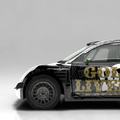
An exact replica of the DC Shoes Race Works livery of the Colin McRae R4, albeit with a strange text that reads "GOLD LIVERY".
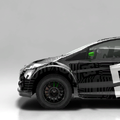
The DC Shoes Race Works livery of the Ford Fiesta OPEN Class.


Tracks

Battersea Route 6. This layout is used in the final game for all areas in the Battersea Compound. However, it is hidden from the player interface as the minimap is disabled in Joyride and Party modes. If you force the game to load a Rallycross race in all areas, the minimap and layout will be displayed.
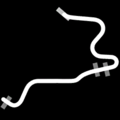
Michigan Trailblazer Routes 3 and 4. This is the layout used in the Drift Showcase 01 event.
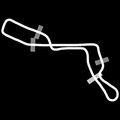
Shibuya Route 2. Originally, Shibuya was supposed to have 8 rallycross tracks, but it was scaled down to the traditional 4 tracks due to unknown reasons.
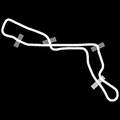
Shibuya Route 3.
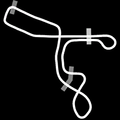
Shibuya Route 4.
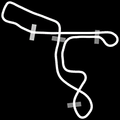
Shibuya Route 5.


Revisional Differences
A Complete Edition was released on April 1, 2015 on Steam. It includes all DLC and replaces Games for Windows Live with Steamworks for online functions. Just like the Mac version, the YouTube integration was removed, though the upload prompt will still display.
- Games developed by Codemasters
- Games published by Codemasters
- Games published by Feral Interactive
- PlayStation 3 games
- Xbox 360 games
- Windows games
- Mac OS X games
- Games released in 2011
- Games released in May
- Games released on May 24
- Games with hidden development-related text
- Games with unused graphics
- Games with unused sounds
- To do
- Needs more images
- Colin McRae/DiRT Rally series
Cleanup
Cleanup
Cleanup
Cleanup > Needs more images
Cleanup > To do
Games > Games by content > Games with hidden development-related text
Games > Games by content > Games with unused graphics
Games > Games by content > Games with unused sounds
Games > Games by developer > Games developed by Electronic Arts > Games developed by Codemasters
Games > Games by platform > Mac OS X games
Games > Games by platform > PlayStation 3 games
Games > Games by platform > Windows games
Games > Games by platform > Xbox 360 games
Games > Games by publisher > Games published by Electronic Arts > Games published by Codemasters
Games > Games by publisher > Games published by Feral Interactive
Games > Games by release date > Games released in 2011
Games > Games by release date > Games released in May
Games > Games by release date > Games released in May > Games released on May 24
Games > Games by series > Colin McRae/DiRT Rally series
Hidden categories > Pages missing date references
Hidden categories > Pages missing developer references
Hidden categories > Pages missing publisher references

